
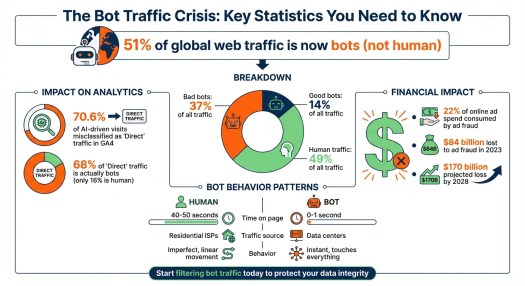
Bots now account for 51% of global web traffic, surpassing human users. This shift impacts how businesses measure website performance and make decisions. Here’s why it matters:
- Bad bots (37% of traffic) inflate metrics, skew data, and make it harder to identify real user behavior.
- AI crawlers from companies like Meta, Google, and OpenAI consume server resources with minimal direct value.
- Analytics tools like GA4 struggle to filter bot traffic, with 70.6% of AI-driven visits misclassified as “Direct” traffic.
- Ad fraud driven by bots costs businesses billions, consuming 22% of online ad spend.
To address this, businesses must refine their metrics, focus on human engagement, and implement tools to filter and block bot traffic. Start by using advanced analytics, JavaScript challenges, and bot management systems like DataDome or Cloudflare to protect data integrity and improve decision-making.
Bot Traffic Statistics: Impact on Web Analytics and Ad Spend
How Non-Human Traffic Distorts Your Data
How to Spot Bot Traffic Patterns
Bots leave behind patterns that are hard to miss once you know what to look for. For instance, if your website sees an unusual spike in sessions without any recent marketing campaigns or promotions, bots might be the culprit. Their behavior is a dead giveaway, too. While real visitors typically spend 40–50 seconds on a page, bots often clock in at 0–1 seconds. They also zip through multiple pages at speeds no human could achieve.
Another clue? Check where the traffic is coming from. Bots often originate from data centers (such as Ashburn, VA) rather than from residential ISPs. A sudden increase in “Direct” traffic paired with a drop in organic traffic is another red flag.
“The Human: Walks in, looks at a shelf, pauses… Their movement is imperfect and linear. The Bot: Teleports to the back of the store, touches every single item in 0.5 seconds, and vanishes.” – Aqsa, CEO, Fantech Labs
Geographic and time-based anomalies are also worth investigating. For example, traffic surges during odd hours or from regions outside your target market often signal bot activity. And if thousands of visits share the same user agent string, you’re likely dealing with non-human traffic.
Spotting these patterns is crucial because they reveal how bots can warp your understanding of user behavior.
Why Surface-Level Metrics Give False Results
Once you recognize bot activity, it becomes clear why relying on basic metrics can lead to false conclusions. Metrics like pageviews and session counts every visit – human or not – unless you actively filter out bots. This can create the illusion of growth when, in reality, bots are inflating your numbers.
Some bots are so advanced that they mimic human actions such as scrolling, moving the mouse, or typing, making them harder to detect. This inflation of session counts can make even your best-performing pages appear to be falling short, since bots rarely complete meaningful actions such as conversions. In one study, 68% of “Direct” traffic was bots, while only 16% came from actual humans.
“If you think you have 10,000 prospects visiting your site, but 4,000 of them are scrapers… your entire financial model is based on a hallucination.” – Aqsa, CEO, Fantech Labs
This kind of distortion doesn’t just mess up your traffic data – it can throw off critical calculations like Customer Acquisition Cost (CAC). It can also ruin A/B testing by introducing noise, leading you to make decisions based on data that doesn’t reflect real user behavior.
Security Risks From Unfiltered Bots
Beyond the distortion of analytics, bots pose serious security risks. Bad bots make up about one-third of global web traffic. These bots scrape your content, attempt to use stolen credentials, and can overload your servers. When your servers are tied up handling bot traffic, your site slows down for real users. This can drive up bounce rates and further skew your metrics.
Ad fraud is another costly issue, consuming around 22% of online ad budgets. Spam bots also waste resources by generating fake leads and skewed data, which can mess up your lead scoring and drain your sales team’s time. Addressing these threats is essential not only to protect your website but also to ensure your metrics reflect actual user behavior.
sbb-itb-0bbf42a
Tools and Methods to Identify and Filter Bot Traffic
Analytics Tools for Bot Detection
If you’re looking to pinpoint bot activity, Google Analytics 4 (GA4) is a solid starting point. It automatically filters out bots using the IAB/ABC International Spiders & Bots List. While this feature is built in and can’t be customized, GA4’s Explorations feature allows you to dig deeper. By creating custom reports that focus on dimensions such as “Hostname” and “Network Domain”, you can uncover suspicious patterns in your traffic.
For WordPress users, Analytify integrates GA4 data directly into your dashboard, allowing you to monitor traffic anomalies without switching tools. If you’re not a fan of technical setups, Graphed simplifies the process by allowing you to query GA4 data with plain English prompts, like asking, “Show me traffic with engagement time under 2 seconds”.
“GA4 can filter some automation, but it can’t prevent all of it. That’s why the goal is to spot patterns and protect decision-grade metrics.” – Sohaib Ahmed, Senior Digital Marketer, Wellows
Once you’ve identified suspicious activity, the next step is to refine your data and separate genuine human traffic from bots.
Separating Human From Bot Traffic
After spotting bot patterns, you can take specific actions to clean up your analytics. Start with GA4’s Admin settings to configure unwanted referrals – this lets you block known spam domains from polluting your data. Dive deeper with Explore reports that combine dimensions such as session source, city, and device with engagement metrics to pinpoint clusters of questionable traffic.
Another effective approach is using JavaScript challenges. These require browsers to execute scripts before tracking tags are triggered, effectively blocking bots that can’t execute JavaScript. If you’re using server-side tracking, secure your setup with API keys and authentication to prevent “ghost” hits from unauthorized sources. Keep in mind that any new filters you apply may take 24–36 hours to appear in your reports.
Bot Management Systems
While filtering data is important, real-time defense is critical to stop bots before they can skew your analytics. Bot management systems act as a frontline defense, blocking bots at the application or DNS layer. Tools like Spider AF, DataDome, and WAF360 intercept bots in real time, preventing them from reaching your server. For example, a B2B SaaS company implemented Spider AF in July 2025 and successfully blocked 400 fake leads in just 60 days, saving over $35,000 in ad spend.
If you’re combating ad fraud, tools like ClickCease and Anura specialize in detecting bots that mimic human behavior, protecting your campaigns from click fraud and fake leads. Cloudflare offers DNS-level screening and Web Application Firewalls (WAF), ensuring malicious bots are stopped at the network edge before they consume server resources. The key difference here is that while GA4 filters bot data after it’s collected, bot management systems prevent it from being collected in the first place.
| Tool Category | Specific Tools | Primary Function |
|---|---|---|
| Analytics | GA4, Analytify, Graphed | Identifying patterns and anomalies in historical data |
| Real-Time Blocking | Spider AF, DataDome, WAF360 | Intercepting and blocking bots at the application or DNS layer |
| Fraud Prevention | ClickCease, Anura | Protecting ad spend and lead forms from sophisticated bots |
| Infrastructure/Edge | Cloudflare | Rate limiting, WAF rules, and server-side tagging validation |
Is Your Traffic Real? How to Diagnose AI-Bot Traffic in Google Analytics
Better Metrics: Focus on Real Engagement and Lead Quality
With bots skewing data, it’s essential to move beyond superficial metrics and focus on those that truly reflect human behavior.
Move Beyond Vanity Metrics
Metrics like total sessions and pageviews may look impressive but often lack substance. Instead, track engaged sessions – sessions lasting over 10 seconds, involving conversions, or including multiple pageviews. These provide a clearer picture of real user activity.
“Stop looking at Total Sessions. That is a vanity metric. Start looking at Engaged Sessions.” – Aqsa, CEO, Fantech Labs
Another key tool is scroll-depth thresholds. Human users scroll unevenly, pausing at points like 25%, 50%, or 75%, while bots tend to scroll uniformly or not at all. Similarly, monitoring interaction rate – actions like expanding FAQs, playing videos, zooming in on images, or highlighting text – helps identify genuine engagement. These micro-actions are intentional and hard for bots to mimic.
Focus on High-Intent Human Actions
Refining your metrics means prioritizing actions only humans can perform. Track KPIs that indicate high intent, such as phone calls, click-to-call actions, and demo requests. Metrics like dwell time – the time users actively engage on a page – offer a better gauge of interest than simple session duration. Repeated sessions, tracked via IP address or User ID, also highlight user loyalty and help differentiate real visitors from bots.
To ensure data accuracy, apply filters, such as excluding Data Center IPs, to focus on verified human sessions. In GA4, you can create custom audiences using filters such as “more than 15 seconds on site”, “more than one page viewed”, and “browser-based” interactions to isolate authentic users.
| Metric Type | Surface-Level (Bot-Inflated) | Human-Driven (Meaningful) |
|---|---|---|
| Traffic | Total Pageviews / Sessions | Verified Human Sessions (>15s + Interaction) |
| Engagement | Bounce Rate / Time on Page | Scroll Depth / Qualified Interaction Events |
| Outcome | Total Form Submissions | Qualified Leads / Revenue Attribution |
Adjust Your Analytics Baselines
Once you’ve identified meaningful engagement metrics, update your analytics baselines to reflect accurate performance. Bots inflate session counts, artificially lowering conversion rates by increasing the denominator. For example, in February 2026, KeyUpSeo reported a case where a client’s conversion rate tripled in just one afternoon after removing bot traffic. This recalibration revealed that 80% of their sessions were fake, and by reallocating their budget to channels with real users, the client doubled their revenue within 60 days.
“Once you remove bots, actual engagement is far higher than the GA reports show.” – Ryan Shelley, Founder, SMA Marketing
When testing new filters in GA4, start in temporary mode to ensure legitimate traffic isn’t excluded. Keep a record of bot identifiers – such as source, landing page, and device – and regularly monitor for unusual patterns, like spikes in “Direct” traffic or sessions with little to no engagement. With cleaner, human-focused data, your optimization strategies will yield far better results.
How to Adapt Your B2B Marketing Strategy
Understanding how bots distort your data is just the beginning. The next step is to reshape your marketing strategy to focus on authentic human engagement. To do this, you’ll need to audit your analytics, rethink your budget allocation, and refine your attribution models to separate AI-driven traffic from real prospects.
Audit Your Analytics Setup
Start by enabling GA4’s bot filtering, but don’t stop there. While GA4 uses the IAB/ABC International Spiders & Bots List to exclude known bots, it often misses more advanced bots that mimic human behavior. Go further by manually excluding bot IPs and internal traffic through GA4’s Admin settings.
Look for telltale signs of bot activity, such as 0-second sessions, unusually high page views, or traffic originating from data centers. Customize GA4 reports to include metrics such as engagement rate, average engagement time, and views per session. These metrics can help you spot genuine human visitors versus bots.
“If you’re not actively separating AI traffic in GA4 from genuine human visitors, you’re operating in the dark.” – Richard Naimy, Strategic AI Leader
To refine your data, create custom “Human” audiences based on behaviors such as sessions lasting over 15 seconds and multiple page views. For deeper insights, export your GA4 data to BigQuery and use SQL to validate user paths. For example, flag any instances where a purchase event occurs without prior page views – an impossible sequence for real users.
Once your analytics are fine-tuned, you’ll be better equipped to shift your focus toward meaningful engagement.
Adjust Your Marketing Budget
Bot traffic can skew engagement metrics, making traditional metrics like CAC unreliable. With $84 billion lost to ad fraud in 2023 – and projections pointing to $170 billion by 2028 – it’s clear that reallocating your budget is critical. Focus on channels that demonstrate verified human interactions and reduce spending on those dominated by bot traffic.
Instead of relying on “Total Sessions”, prioritize “Engaged Sessions” – sessions lasting over 10 seconds or leading to a conversion. Filter out robotic behaviors, such as flawless mouse movements or 0-second sessions, before adding these users to retargeting pools. Redirect your budget toward actions bots can’t fake, such as tracked phone calls, completed transactions, and verified email opt-ins.
Build Attribution Models That Account for AI Traffic
Traditional last-click attribution is no longer sufficient, as roughly 70.6% of AI-driven traffic appears as “Direct” due to missing referrer data. To refine your attribution, start by distinguishing between “AI Search Referrals” (human users coming from tools like ChatGPT) and “AI Crawlers” (scripts like GPTBot that scrape content).
Create a custom channel group in GA4 to capture known AI sources using regex:
chatgpt.com|perplexity.ai|claude.ai|gemini.google.com. Use Google Tag Manager and custom JavaScript variables to capture document.referrer, which can sometimes retain data that HTTP headers miss. For added security, consider server-side tagging, which uses HMAC signature verification and origin validation to make bot spoofing more difficult.
“Traditional attribution models are dead. Last-click attribution can’t measure influence occurring in dark funnels.” – Marco Di Cesare, Founder, Loamly
Focus on metrics that bots find hard to manipulate, like tracked phone calls, qualified demo requests, and completed transactions. Additionally, monitor spikes in branded search volume in Google Search Console after publishing content – this can serve as a proxy for AI-driven discovery that didn’t result in direct clicks. Finally, apply machine learning models in BigQuery to classify sessions as “Human” or “Crawler” based on interaction patterns and page load speeds. For instance, sessions with load times under 100ms are likely bot-driven.
Conclusion
The internet landscape has shifted dramatically. With bots now accounting for 51% of all web traffic, the metrics many businesses have trusted for years are no longer reliable. Decisions based on skewed data – whether it’s about budget allocation or channel performance – are built on shaky ground, clouded by noise instead of clarity.
But here’s the good news: the solution is straightforward, though it requires decisive steps. Start by activating bot filtering in GA4. Then, dig deeper – audit your “Direct” traffic for inconsistencies, implement server-side validation to verify interactions, and build custom audiences that reflect real human behavior. Move away from vanity metrics like total sessions and focus on engagement-driven KPIs that bots can’t mimic, such as tracked phone calls, qualified form submissions, and completed transactions.
“If you can’t trust the input, you cannot trust the strategy.” – Aqsa, CEO, Fantech Labs
This isn’t just about better reporting – it’s about safeguarding your revenue. With $84 billion lost to ad fraud in 2023 and projections hitting $170 billion by 2028, ignoring bot traffic is a costly mistake. By prioritizing clean, human-only data, you’ll stop wasting resources on phantom users and start focusing on what truly drives growth.
The winners in 2026 won’t be the ones chasing the highest traffic numbers. They’ll be the businesses that know, without a doubt, which visitors are worth their time and investment.
If you’re unsure how much of your website traffic is actually driving real business outcomes, contact us for help. We can do an AI and site audit to identify hidden data distortions, uncover true human engagement, and provide a clear path to improving qualified lead generation.
FAQs
How much of my “Direct” traffic is actually bots?
Recent studies reveal that approximately 30% of your “Direct” traffic may actually be bots. In fact, over half of all web traffic is generated by non-human sources. Many of these bots – whether they’re AI-powered or malicious – often show up as “Direct” traffic in your analytics reports. This can skew your performance metrics, making it essential to identify and account for bot activity when evaluating your website’s data.
Which KPIs best reflect real human engagement in B2B?
When it comes to measuring authentic human engagement in B2B, the most dependable KPIs focus on actions that indicate genuine interest, such as qualified lead generation, form submissions, demo requests, and content downloads. Additionally, metrics like time spent on site, pages per session, and content engagement can offer valuable insights – especially when you’ve taken steps to filter out bot traffic. Implementing tools and strategies to exclude non-human activity is crucial for maintaining accurate data and making informed decisions.
What’s the fastest way to block bots without hurting real users?
The fastest way to keep bots at bay while ensuring genuine users can still access your site is by implementing layered defenses. Start with cloud-based tools such as Bot Fight Mode or custom WAF (Web Application Firewall) rules to handle threats at the network level. Then, reinforce this with server-side measures like rate limiting or tools like fail2ban to block suspicious activity.
To reduce the risk of mistakenly flagging real users, take time to analyze traffic patterns. Look for red flags such as high bounce rates or traffic from unusual locations. Use tools like Google Analytics or specialized bot detection software to fine-tune your filters and ensure you’re targeting bots without inconveniencing legitimate visitors.
The post Half of Website Traffic Isn’t Human. It’s time to Rethink Performance Metrics. appeared first on Smart Web Marketing.